PulseChat
OmniChannel AI Customer Service module for Perfex CRM

See it in action
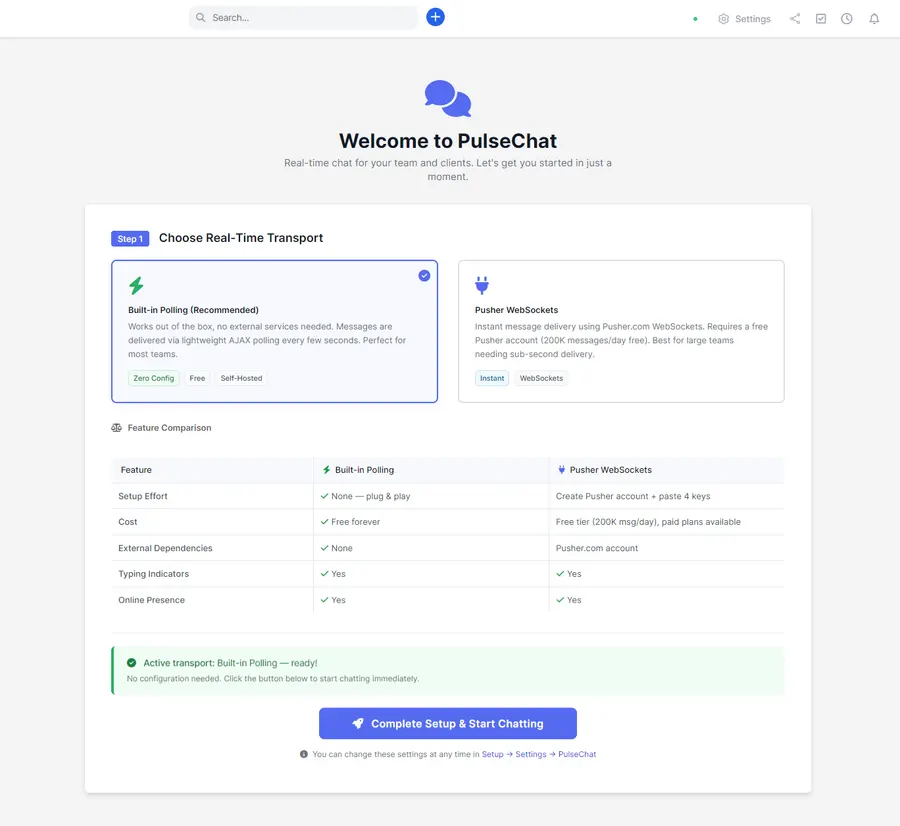
About PulseChat
Answer every customer from one screen, no matter where they message you from. PulseChat turns Perfex CRM into an AI-powered omnichannel inbox: WhatsApp, Telegram, Email, SMS, Slack and Viber all land in one place, super-charged by ChatGPT and Claude. Your team drafts replies, summarizes long threads and translates messages in real time without ever leaving the CRM.
Support and sales teams lose hours bouncing between browser tabs, phones and shared inboxes. PulseChat ends that. Every external conversation lands in a dedicated Channels tab, each sender is matched to the right Perfex client, contact or lead, and your agents reply with the full customer record in view. It feels like Slack or Teams, but fully aligned with your tickets, invoices and sales pipeline.
One omnichannel inbox for every conversation
PulseChat creates a dedicated Channels tab where every external conversation lands. Connect the channels your customers already use and route them all to one place:
- WhatsApp - reply to customers as a team from a verified business number.
- Telegram - connect your bot and centralize chats directly in Perfex.
- Email - turn shared inboxes into real-time conversations over IMAP and SMTP.
- SMS - keep text threads attached to the right clients and leads.
- Slack and Viber - bridge the channels you already run into your CRM.
Each external contact is automatically mapped to a client, contact or lead whenever possible, so agents always see who they are talking to - name, company and role - alongside open tickets, invoices, previous interactions and the full omnichannel history in a single timeline. No more guessing “who is this number?”; PulseChat unifies identities and keeps your CRM as the single source of truth.
A built-in AI assistant powered by ChatGPT and Claude
PulseChat ships with an AI assistant that understands your conversations and helps your team reply faster, better and in the right tone:
- Draft Reply - one click to generate a complete response from the last messages in the thread, ready to review and send.
- Smart Suggestions - three short, ready-to-send replies as clickable chips, ideal for fast support.
- Rewrite - make a draft more professional, friendly or concise without retyping it.
- Spelling and Grammar - clean up messages before sending, in any supported language.
- Summary - condense a long back-and-forth into a few bullet points for quick staff handovers.
- Sentiment Analysis - detect angry or at-risk customers and prioritize the critical cases.
- Translation - translate on the fly and reply in your customer’s own language.
Under the hood, PulseChat can talk to OpenAI (ChatGPT) and Anthropic (Claude), with configurable models (gpt-4o, gpt-4o-mini, Claude 3.5 and more), temperature and max-token controls, a customizable system prompt to match your brand’s tone, and per-conversation AI usage logs with cost estimates for full control. Your agents stay in charge: AI drafts and suggests, humans approve and send. The result is faster replies, more consistent tone and happier customers.
Automation rules that triage for you
PulseChat’s omnichannel engine includes a flexible Automation Rules system. Define rules once - for example, route a WhatsApp message that hits your sales number to the Sales team and tag it as a lead; open a ticket and set status to pending when an email subject contains “support”; auto-set priority to urgent and notify the account manager when the customer is marked VIP; or route a Spanish message to the Spanish-speaking team with a translated AI draft ready to go. From there, the module handles the busywork on every incoming message:
- Route automatically to the right staff member or team.
- Set status and priority the moment a conversation arrives.
- Tag for reporting and filtering so categorization happens without manual effort.
- Trigger AI auto-replies for common, low-risk questions.
- Create tickets straight from a conversation so nothing falls through the cracks.
Combined with the AI assistant, automation rules turn PulseChat into a 24/7 frontline that never forgets a lead, never misses a message and always follows your playbook.
A modern chat experience for support and sales
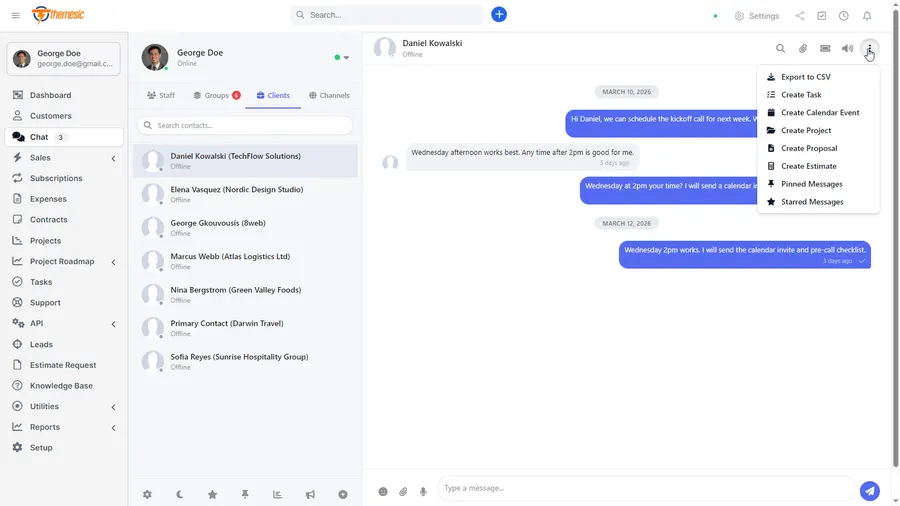
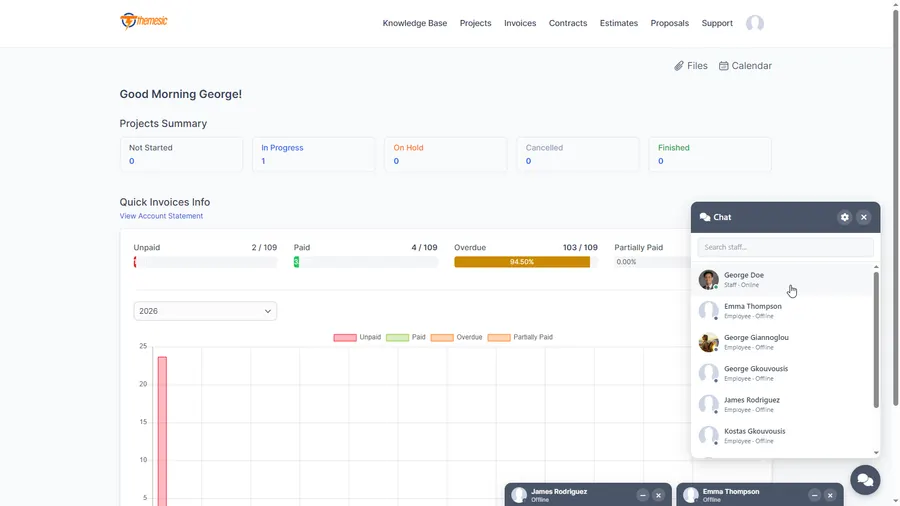
Beyond external channels, PulseChat brings a familiar, Slack-style messaging layer directly into Perfex:
- Staff-to-staff direct messages for internal coordination.
- Staff-to-client messaging through the client portal.
- Group conversations for teams, projects or topics.
- A Channels tab dedicated to external omnichannel conversations.
- Filters for status, priority, channel type and tags.
- Unread counters and typing indicators where supported.
Agents can pin important conversations, see CRM context (client, contact, lead) in a side panel, mix canned responses with AI-generated replies, and handle several conversations at once without losing track. Everything stays inside Perfex - no extra SaaS, no extra logins, and full control on your own infrastructure.
Built as a first-class Perfex module
PulseChat respects your existing permissions and security model. Granular capabilities control who can use AI, manage channels or view analytics; channel credentials and tokens are stored encrypted; and every AI call is logged with model, tokens, cost and duration per conversation. It also respects Perfex cron and background jobs, so email polling and other recurring tasks run the way your installation already expects.
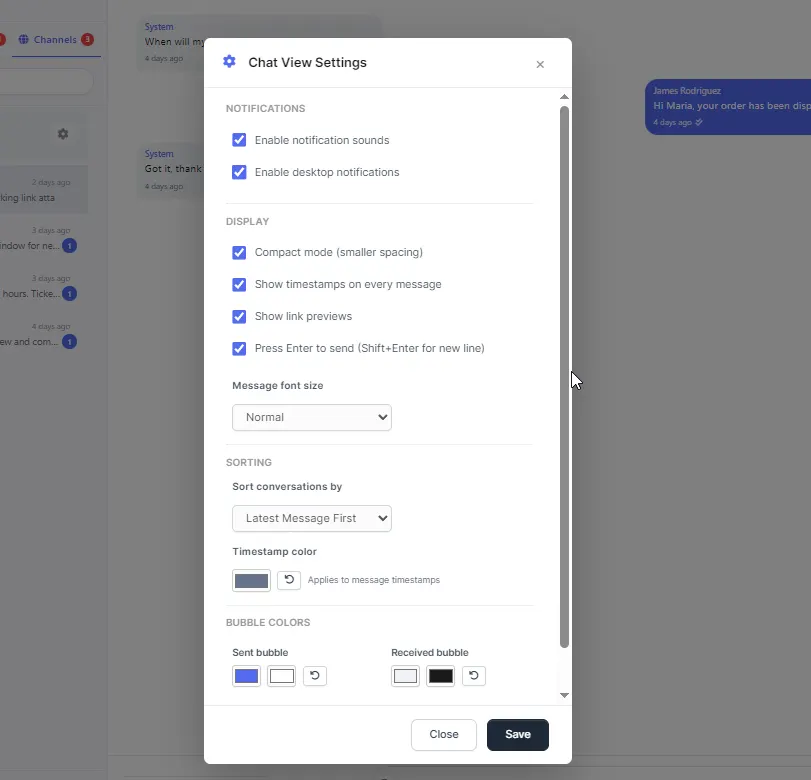
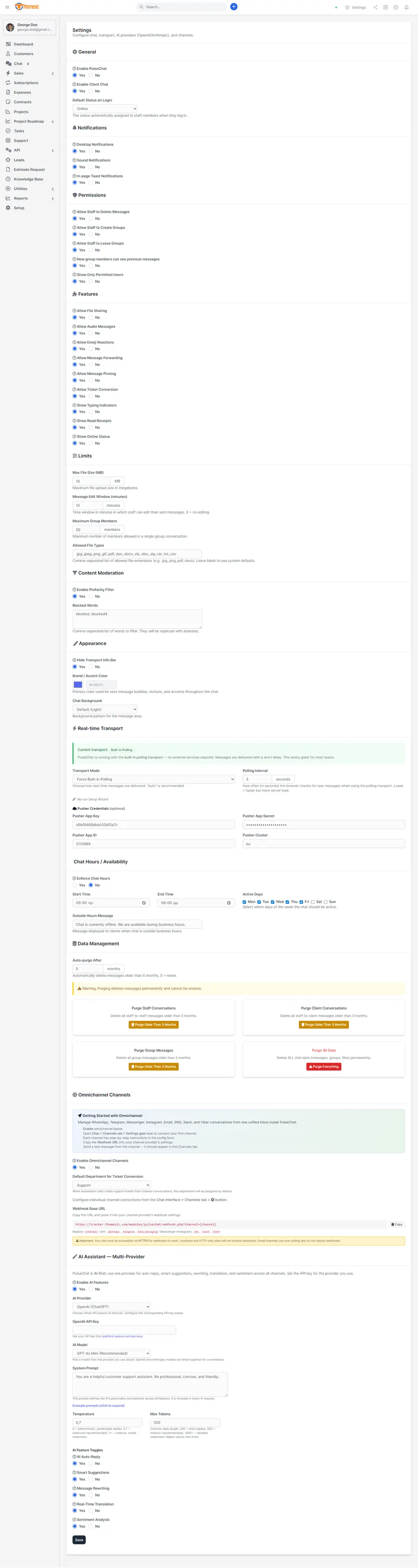
Configuration happens in a dedicated PulseChat Settings area, where you can:
- Enable or disable individual omnichannel channels.
- Configure the WhatsApp, Telegram, Email and other adapters.
- Turn AI features on or off and select providers and models.
- Adjust automation rules and defaults to match your workflows.
You stay in full control of what AI can do, which channels are active and how your team uses PulseChat day to day.
How teams use PulseChat
Lead generation on WhatsApp. A new lead messages your sales number. PulseChat creates or matches the external contact to a Perfex lead, applies an automation rule to assign the conversation to the Sales team, lets AI propose a friendly welcome and a few qualifying questions, and stores the whole thread under the lead profile for future reference.
Multi-language support via email and Telegram. Customers reach you through both email and Telegram in different languages. PulseChat centralizes every message into unified omnichannel conversations, uses AI translation so agents can reply in English, Spanish, French and more, and summarizes long threads so new agents can jump in quickly.
Internal and external collaboration. A support agent needs help from the dev team on a tricky question. They keep the external conversation in the Channels tab, open a staff group chat to discuss it internally, let AI propose a clear, non-technical answer, and send the final reply back through the same channel the customer used.
Why PulseChat
- Truly omnichannel - WhatsApp, Telegram, Email, SMS, Slack, Viber and more in one inbox.
- AI-first - ChatGPT and Claude integrated deeply into daily workflows.
- Built for Perfex - not a generic chat tool; it lives inside your CRM.
- Better customer experience - faster replies, consistent tone, no lost messages.
- Happier teams - less copy-pasting, less context-switching, more automation.
If you want to turn Perfex into a modern, AI-powered communication hub where your team handles every channel without leaving the CRM, PulseChat is built exactly for that.
Setup and support
Quick setup takes only a few minutes to install, activate and have a fully operational CRM integration running smoothly, with no coding required - just connect your channels by following the included documentation. PulseChat is a module for Perfex CRM and runs on your own infrastructure.
Support that actually answers
Buy direct and you reach the people who wrote the code - not a marketplace ticket queue.
- Priority support - replies the same day, straight from the development team that built it.
- Six months of priority support on Standard (extendable), and instant priority support on Pro for as long as the subscription is active.
- Support covers guidance on installation, configuration and upgrades - real answers, never canned macros.
- Regular updates and immediate bug fixing, included in every license type.
-
- Fixed: on some installations, incoming emails/messages could be fetched but not saved to the inbox; they are now stored reliably.
- Improved email import: each message is saved before the poller advances, so a message is never skipped or lost if saving fails, with per-message results written to the email-channel log.
- Incoming mail is no longer marked as read until it has been safely stored.
- Fixed: creating a support ticket from a conversation for contacts not linked to a Perfex customer.
- Ships with a guarded migration that ensures the required database column exists; upgrades apply automatically with no impact on existing data.
Ready to drop PulseChat into your stack?
Standard $49 one-time, or Pro from $9/mo billed yearly - updates and support while your subscription is active, and quick, secure checkout. Cheaper than the old CodeCanyon price, with no marketplace cut.
Read it before you buy it
Everything below is public. You can judge PulseChat without spending anything, and without asking us.
-
Documentation, in the open
The full PulseChat documentation lives on GitHub at
themesic/PulseChat-OmniChannel-AI-Customer-Service-for-Perfex-CRM- setup, configuration and day-to-day use, readable in a browser before you decide.
The sales and rating on this page are recorded by CodeCanyon, not by us: a review can only come from an account that bought the product, and every release passes Envato's review before buyers receive it. More on what we publish and how to check each figure yourself: open source and open specs at Themesic.
Frequently asked questions
Everything you need to know before buying - and what to do if you still have questions.
Is PulseChat compatible with the latest version?
Yes - the current release is v1.3.8, last updated September 2026, built for PHP 7.x, PHP 8.x, MySQL 5.x, MySQL 8.x, CodeIgniter. Lifetime updates keep it current as new platform versions ship.
What does the $49 Standard license include?
One payment of $49 covers the exact same files sold on CodeCanyon - full unencrypted source code, documentation and lifetime free updates - plus six months of developer support, at a lower price than the marketplace. It licenses a single installation you own and run.
Can I use PulseChat in a SaaS or a client product?
That is what the Pro plan is for: $9/mo billed yearly. It adds instant priority support for as long as the subscription is active, installation on unlimited domains you own, and the right to use the module in SaaS and multi-tenant products.
How do I receive the product after buying?
Checkout runs through Stripe. Your license key and download are issued instantly, and every future update is available from your account the moment it ships.
Related products
Other Perfex CRM Modules built and maintained by the same team, sold direct.


Featured in these guides
Comparisons from our catalogue where PulseChat earns its pick - see how it stacks up.