Mailbox - Webmail Client for Perfex CRM
Webmail Client & Email Automation Module for Perfex CRM
See it in action
About Mailbox
A full webmail client inside Perfex CRM: staff connect their own IMAP inbox, Gmail or Outlook via OAuth2, and link email to the right customer or lead. Mailbox lets each user send, receive, draft, organize and label email without ever leaving their dashboard - and turn any message into CRM work in a single click. Instead of bouncing between a separate webmail tab and your customer records, the conversation and the context finally live in the same place. It goes further than webmail, too: incoming mail files itself against the right customer or lead, the whole relationship sits in a sidebar beside every message, and follow-up reminders make sure no conversation goes cold. It is email, fully integrated into the project-management tool your team already relies on every day.
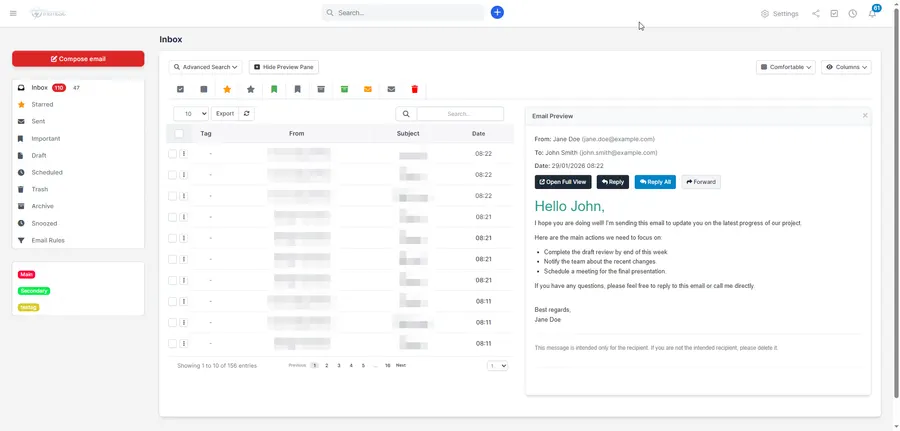
A modern Gmail-style inbox, not a stripped-down widget
Mailbox feels like the email clients your team already knows. A clean, compact Gmail-style interface gives you email threading with collapsible conversations, a split-view preview pane for quick scanning, archive and snooze to keep things tidy, starring and important flags, and advanced search that finds any email instantly using multiple filters. Tune the layout to the way you work with three density views - Cozy, Comfortable and Compact - and a column visibility toggle that hides what you do not need. Bulk actions, a three-dots action menu and a read-emails counter round out day-to-day handling, and a localized interface keeps global teams comfortable in their own language.
It stays quick as the mailbox grows. Database indexes tuned for the list view and for sender lookups keep large inboxes responsive, and instant full-text search covers subject and body together, with an automatic fallback on older MySQL versions.
By default the module performs a one-way sync that fetches your unread inbox mail into Perfex, where actions like Star, Trash and Important are stored locally in the database along with their attachments. If you want your mailbox kept perfectly aligned, per-staff read status sync writes the read state back to your email server - open an email in Perfex and it is automatically marked as read on Gmail or Outlook too, with auto-mark-as-read controls for both the preview pane and the single-message view.
Connect any account - securely
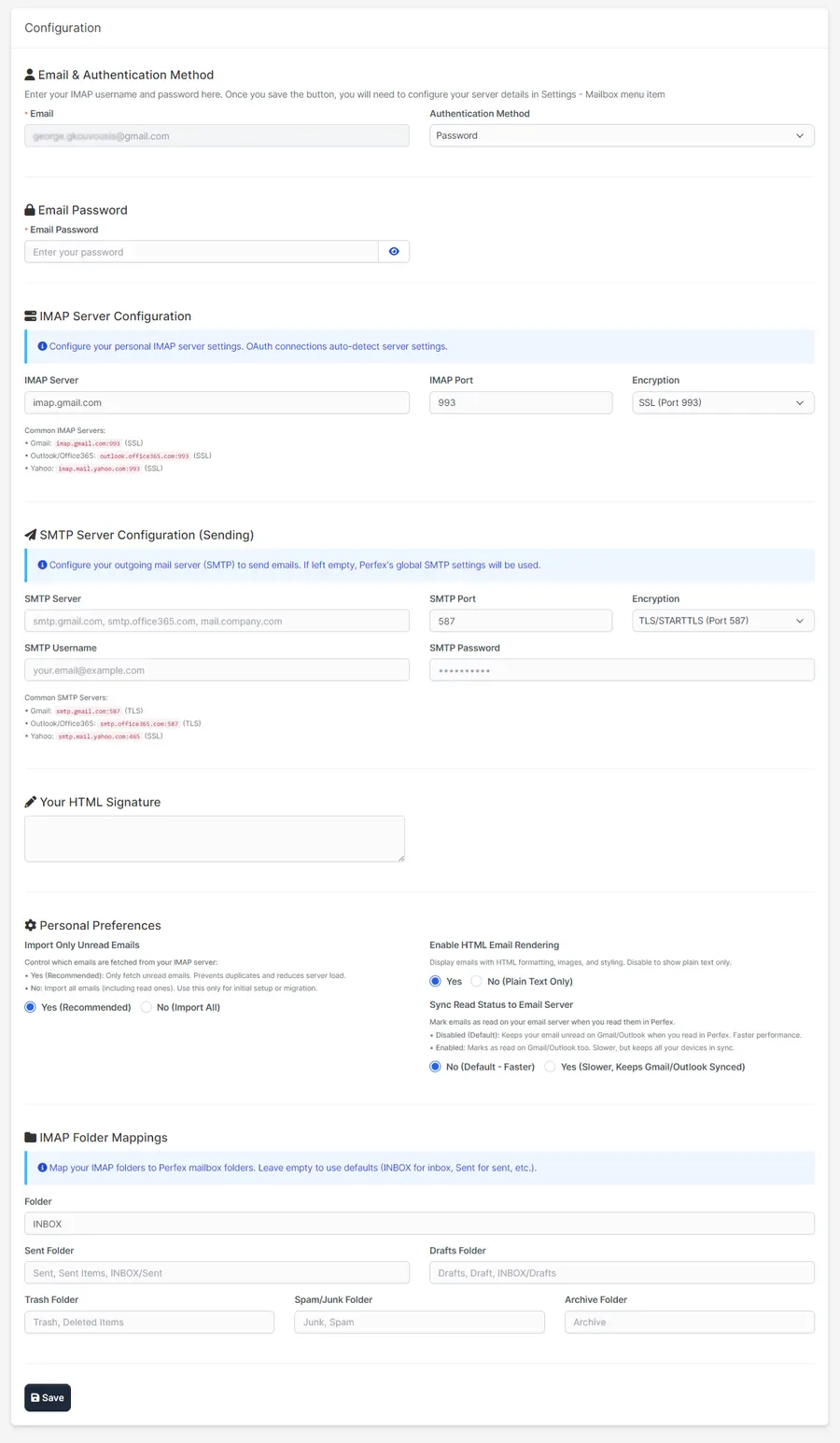
Every staff member configures their own connection, so company email is centralized while inboxes stay separate and private. Each user sets their own IMAP server, port and encryption, maps their Sent, Drafts, Trash, Spam and Archive folders, and chooses per-staff preferences such as importing unread only and toggling HTML rendering. The module signs in to the IMAP server using the staff member’s own profile email address, which each person can change from their profile at any time.
Security is enterprise-grade. For Gmail and Outlook, OAuth2 authentication means secure, password-free connections with no credentials to store, and tokens are encrypted and refreshed automatically before they expire. Where passwords are still used, they are encrypted with AES-256-CBC before they ever reach the database. Sending is covered too: OAuth2 email sending works for Gmail and Outlook, with Outlook handled through a single Exchange Online resource and SMTP XOAUTH2. Under the hood, Mailbox runs on a modern, actively maintained IMAP library (Webklex/php-imap v4.x), with database performance indexes, batch processing for the initial sync of large inboxes and a manual email-sync endpoint when you want to pull mail on demand.
The module has since been through a security audit and hardened on the back of it. Staff mail is strictly scoped to its owner across every view and action, email content is sanitized against a strict allowlist while sender, subject and recipient fields are escaped on output, and attachments are served through an authenticated, download-only endpoint that cannot execute. State-changing actions require POST, OAuth sign-in validates an anti-CSRF state token, and internal error detail is kept out of user-facing responses.
Sync itself is leaner and more dependable. Message bodies are no longer fetched twice on every cycle, so runs are faster and use less bandwidth. Each sync mode keeps its own checkpoint, which means switching an account between “unread only” and “fetch all” no longer skips older messages, and already-synced mail is never re-imported. Mailbox rebuilds and migrations no longer cause sync to silently skip all new mail, thanks to UIDVALIDITY tracking, deactivated staff are skipped, and a Debug Mode toggle keeps routine housekeeping out of the activity log. Emails store the real received date and read state from the server, and a send that fails is reported as Failed rather than Sent.
Compose, automate and schedule
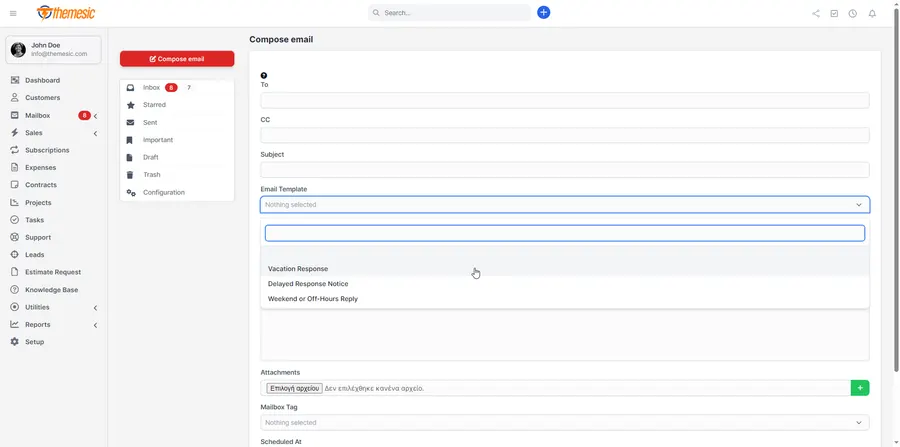
A rich WYSIWYG compose experience makes writing email comfortable, with file attachments, inline images, dynamic merge fields and keyboard shortcuts. Reusable email templates and signature management keep replies fast, polished and on-brand. Need a message to land at the perfect moment? Schedule it with Send Later so it goes out when engagement is highest, whether you are syncing with global teams or planning drip campaigns.
Let routine handling take care of itself. A powerful email rules system filters and organizes incoming mail based on custom conditions and actions, and auto-replies keep conversations going while staff are away - automatically sending personalized messages when leads, tickets or clients reach specific stages in your workflow, so follow-up stays consistent every time.
The rules engine now reaches into the CRM as well. Match on sender, subject, body or recipient, then link the message to a client or lead, capture a brand-new lead, create a task or a support ticket, assign it to a staff member, snooze it, star it or apply a tag. Build the workflow once and every incoming email routes, files and follows itself. Auto lead capture takes that one step further: a message from an unknown sender to your sales address becomes a Perfex lead on its own, filed against the original conversation. It is careful about noise - newsletters, no-reply addresses and system notifications are skipped, existing contacts and leads are never duplicated, and a lead you have already rejected is not recreated on the next email.
Saved replies keep answers fast and consistent. Build a personal library of snippets or share one with the whole team, drop a reply in with a quick shortcut, and let merge tags such as {contact_firstname}, {client_company}, {lead_name} and {staff_fullname} fill in the details straight from the email you are answering.
Organize with tags, labels and folders
Apply multiple color-coded tags and labels to any email and triage hundreds of conversations at a glance. Create, edit and filter by tags like Important, Support or VIP Lead to segment your mailbox and prioritize responses. Keep things tidy with nested folders, smart live filtering and quick-move actions, then reach any tagged conversation in a single search - perfect for teams managing high volumes of email daily.
Where email meets your CRM
This is what a webmail client built for Perfex can do that a standalone one never will: act on an email directly against your CRM records.
Most of that filing now happens on its own. Smart CRM auto-link matches the sender of every incoming message against your records and links it to the right customer or lead the moment it arrives - no clicks, no missed connections. It is deliberately careful: only an exact, single, active match is linked, so an ambiguous address is left for you to decide rather than guessed at. From any message you can also:
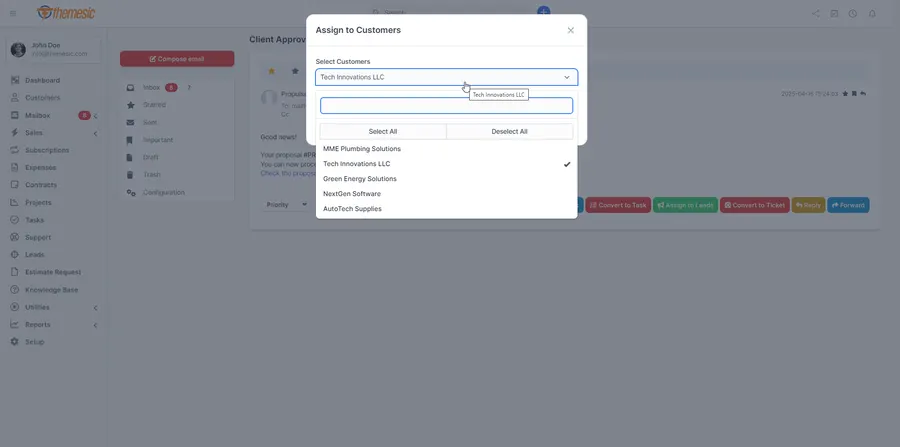
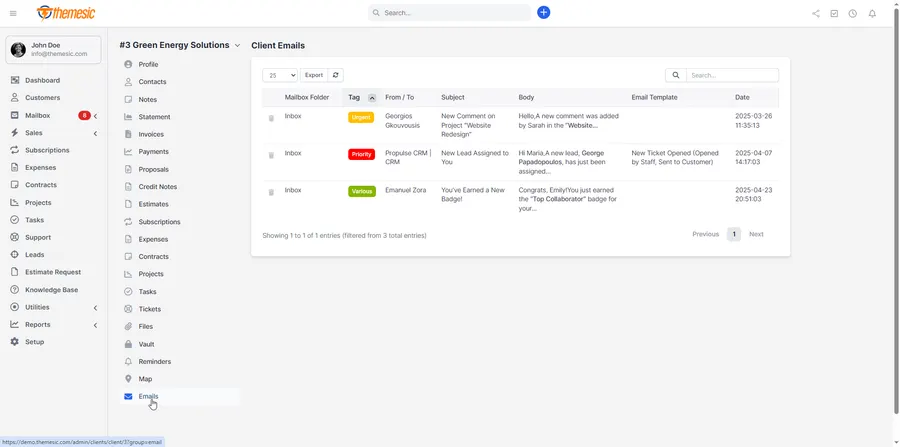
- Assign it to a customer and keep the full thread on that customer’s profile as an internal conversation, right next to their invoices, projects and tickets.
- Convert it to a task - assign it to your team, set deadlines and track progress, all linked back to the original conversation.
- Convert it into a support ticket - tag, prioritize and route the inquiry to the right department so nothing slips through the cracks.
- Link it to a lead - tie inbound messages to your sales pipeline, and a dedicated Conversation tab on the lead collects every assigned email into one context-rich history.
- Raise an estimate, invoice or proposal - one click from the email, pre-filled for the linked customer or lead.
Open any message and the sender context sidebar shows you the whole relationship at a glance: company, open invoices, overdue balance, open tickets and your recent conversation history, with a direct link through to that customer or lead profile. You answer with full context without leaving the inbox. Every linked email, inbound and outbound, is written onto the lead’s native activity feed as well, so the complete conversation record sits in the Perfex timeline your sales team already reads.
Contact management is built in as well. Maintain a unified, CRM-integrated address book and add, edit or merge contacts directly from the mailbox interface, complete with profiles and communication logs, plus address autocomplete that speeds up every new message.
Follow-ups and first-response times
Send an important email, set a reminder against it, and forget it. If the client stays quiet, Mailbox nudges you at the right moment with a Perfex notification; if they reply, the reminder cancels itself, because the module sees the response come in. No more deals going cold because a follow-up slipped.
Incoming mail is watched the same way. Set a first-response target and messages carry a clear Due soon, Overdue or Answered in time badge, so your team knows exactly what needs a reply right now. Automated senders are ignored, because a newsletter is not a case to answer.
Built for teams, installed in seconds
Because each staff member runs their own account, Mailbox centralizes company communication while keeping every inbox private. Reusable templates and signature management keep everyone consistent, the localized interface suits international teams, and the whole experience lives inside the CRM your staff already use all day. It takes only a few seconds to install and activate before you have a fully working Mailbox client. Existing installations upgrade automatically: the module adds its new tables and columns on update, with the migration path hardened against silent database errors, so nothing needs doing by hand.
Requirements
Mailbox is a module for Perfex CRM and requires PHP 7.4 or newer. You need an IMAP-enabled email account - POP accounts are not supported - that can accept SSL/TLS connections from a third-party app, namely your Perfex installation. If your account uses two-factor authentication or OAuth, connect Gmail or Outlook through OAuth2 for a secure, password-free login; with any other provider you need to disable it first, or your mail server will refuse the connection. Perfex’s cron job must also be configured correctly so mail is fetched in the background. Sent mail is stored in the module’s Sent folder and uses Perfex’s own outgoing email settings.
Support that actually answers
Buy direct and you reach the people who wrote the code - not a marketplace ticket queue.
- Priority support - replies the same day, straight from the development team that built it.
- Six months of priority support on Standard (extendable), and instant priority support on Pro for as long as the subscription is active.
- Support covers guidance on installation, configuration and upgrades - real answers, never canned macros.
- Regular updates and immediate bug fixing, included in every license type.
-
- Performance and search
- Faster inbox on large mailboxes: added the database indexes the list view and sender lookups always needed.
- Instant full-text search across subject and body, with an automatic fallback on older MySQL.
- Leaner IMAP sync: message bodies are no longer fetched twice on every sync cycle - less bandwidth, faster runs.
- Quieter activity log: routine sync housekeeping moved behind Debug Mode, so the log shows what matters.
What customers say
Verified buyer reviews from CodeCanyon, where Mailbox holds a 4.78 / 5 rating across 41 ratings.
This product is a must have for any Perfex user. The author makes updates that extend the module as perfex grows. Having email is a must have and they do it the best. Thank you!
After an update, my email module did not work as expected. Unfortunately, my support had expired, and I had to renew it. Once I renewed my support, the help from the developer was absolutely perfect. Various adjustments were made to the module to resolve my issues. I am particularly pleased with the support from this developer. John, thank you! ;)
Top notch code quality, great features, reloable support!
Ready to drop Mailbox into your stack?
Standard $49 one-time, or Pro from $9/mo billed yearly - updates and support while your subscription is active, and quick, secure checkout. Cheaper than the old CodeCanyon price, with no marketplace cut.
Read it before you buy it
Everything below is public. You can judge Mailbox without spending anything, and without asking us.
-
Documentation, in the open
The full Mailbox documentation lives on GitHub at
themesic/mailbox-for-perfex-docs- setup, configuration and day-to-day use, readable in a browser before you decide.
The sales and rating on this page are recorded by CodeCanyon, not by us: a review can only come from an account that bought the product, and every release passes Envato's review before buyers receive it. More on what we publish and how to check each figure yourself: open source and open specs at Themesic.
Frequently asked questions
Everything you need to know before buying - and what to do if you still have questions.
Does Mailbox work with Gmail and Outlook?
Yes. Gmail and Outlook, including Microsoft 365, connect through OAuth2 for both sign-in and sending, so there is no mailbox password to store. Tokens are encrypted and refreshed automatically before they expire, and Outlook sending runs through Exchange Online and SMTP XOAUTH2.
Can I connect an email account that is not Gmail or Outlook?
Yes, if it is an IMAP account that accepts SSL/TLS connections. Each staff member enters their own server, port and encryption and maps their Sent, Drafts, Trash, Spam and Archive folders, and any stored password is encrypted with AES-256-CBC. POP accounts are not supported. If the account uses two-factor authentication, you need to disable it first, or the mail server will refuse the connection.
Can other staff members see my email?
Mailbox keeps inboxes apart. Each staff member connects their own account, and mail is strictly scoped to its owner across every view and action, so company email is centralized in Perfex CRM while each inbox stays private.
Does Mailbox sync changes back to my mail server?
By default, sync is one-way: Mailbox fetches unread inbox mail into Perfex, and actions such as Star, Trash and Important are stored in Perfex. Each account can import unread mail only or fetch all. If you want the read state kept in step, turn on per-staff read status sync, and emails opened in Perfex are marked as read on the mail server too, Gmail and Outlook included.
What do I need to run Mailbox?
Perfex CRM, PHP 7.4 or newer, an IMAP account that accepts SSL/TLS connections from your Perfex installation, and a correctly configured Perfex cron job, which fetches mail in the background. A manual sync endpoint is also there for when you want to pull mail on demand.
Do I need to do anything by hand when I update?
No. Existing installations upgrade automatically: Mailbox adds its new tables and columns on update, and the migration path is hardened against silent database errors. Updates are available from your account as they ship.
Is Mailbox compatible with the latest version?
Yes - the current release is v2.3.1, last updated September 2026, built for PHP 7.4+, PHP 8.x, CodeIgniter framework. Lifetime updates keep it current as new platform versions ship.
What does the $49 Standard license include?
One payment of $49 covers the exact same files sold on CodeCanyon - full unencrypted source code, documentation and lifetime free updates - plus six months of developer support, at a lower price than the marketplace. It licenses a single installation you own and run.
Can I use Mailbox in a SaaS or a client product?
That is what the Pro plan is for: $9/mo billed yearly. It adds instant priority support for as long as the subscription is active, installation on unlimited domains you own, and the right to use the module in SaaS and multi-tenant products.
How do I receive the product after buying?
Checkout runs through Stripe. Your license key and download are issued instantly, and every future update is available from your account the moment it ships.
Related products
Other Perfex CRM Modules built and maintained by the same team, sold direct.


Featured in these guides
Comparisons from our catalogue where Mailbox earns its pick - see how it stacks up.