Account Planning
Data-Driven Strategic Module for Perfex CRM

About Account Planning
Turn key accounts into growth engines, right inside Perfex CRM
Stop managing your most important clients in spreadsheets and scattered notes. The Account Planning module for Perfex CRM turns the CRM you already use into a strategic account-management workspace. Capture vision, mission, financials and marketing activity; build objectives and action plans; link plans to real projects, invoices and estimates; and let clients view their plans and request updates - all without leaving Perfex.
Every plan is organised under four core sectors - Due Diligence, Team Information, Service Ability Offering and Planning - with fast, spreadsheet-style data entry, a built-in MindMap for visual strategy, and a dashboard that surfaces revenue versus plan, at-risk accounts and plan health. Whether you manage enterprise accounts, key clients or strategic partnerships, it gives you the structure, visibility and automation to grow relationships and forecast with confidence. As a native Perfex CRM module, it draws directly on your existing clients, projects, invoices, estimates, tasks and staff, so there is no duplicate data and nothing to keep in sync by hand.
Four core sectors for every plan
Each account plan is built from the same four sectors, so your whole team works to one consistent framework.
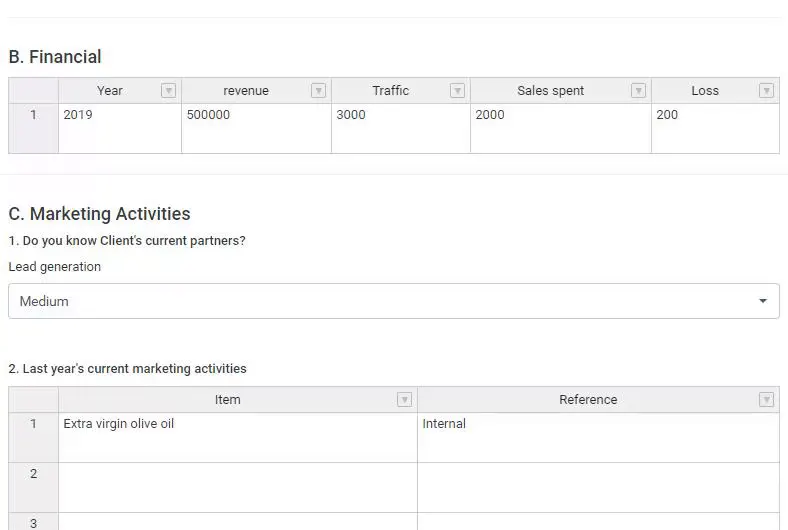
- Due Diligence - record financial data (year, revenue, sales spent, traffic, loss) and marketing activities in spreadsheet-style tables, alongside the client’s background, partners and prior-year activity. Handsontable keeps data entry fast and structured.
- Team Information - keep your company team and the client’s team together in one place, each contact captured with title, email, phone, personality, highlight notes and working status, so you never lose track of who’s who on the account.
- Service Ability Offering - map the current services the client uses and the offerings you could expand into, with potential, scale and prioritization, to understand what you deliver today and where you can grow.
- Planning - set objectives, threats, opportunities, criteria to success and constraints; build a structured to-do list of objectives, items and tasks with a Person In Charge (PIC), deadlines and status; classify accounts with the BCG model (Question Marks, Stars, Dogs, Cash Cows) and a Red/Yellow/Green client status; and track revenue next year, margin and wallet share. Rich text editors capture the strategy in detail, and the MindMap brings it to life visually.
MindMap - visual strategy at your fingertips
Develop and present your account strategy visually without ever opening an external tool. The built-in MindMap editor lets you add and edit nodes with a click of the LAMP icon, keeping the strategy where the plan lives.
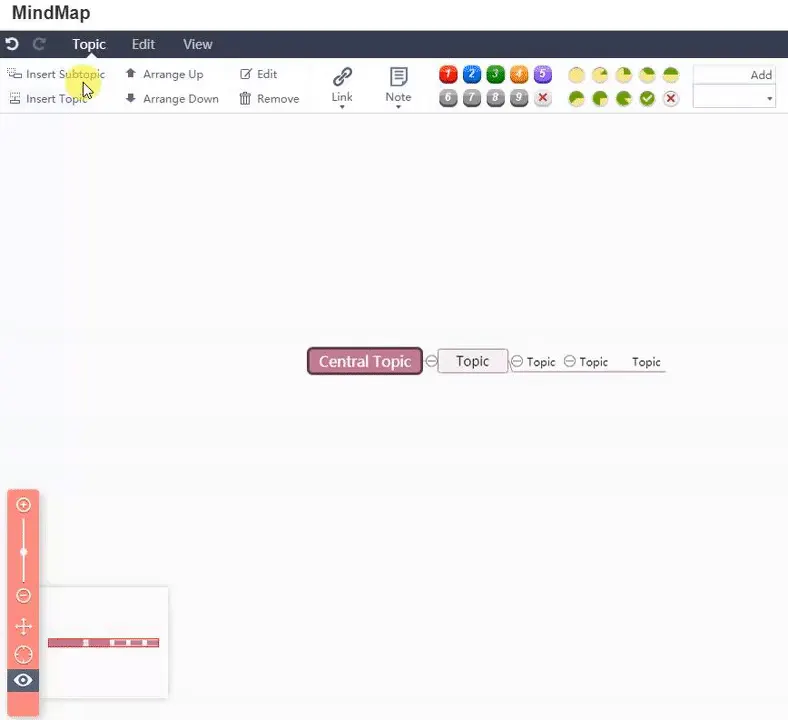
- Built-in MindMap editor - brainstorm objectives and relationships as a visual map inside the plan, with no external tools to wrangle.
- Export as PNG or SVG - drop a scalable, professional strategy map straight into presentations, reports and client decks.
Relations - link plans to real work
An account plan is only as good as its connection to delivery. Link plans to actual Perfex projects, invoices, estimates and proposals, and keep tasks in sync both ways so nothing drifts out of date.
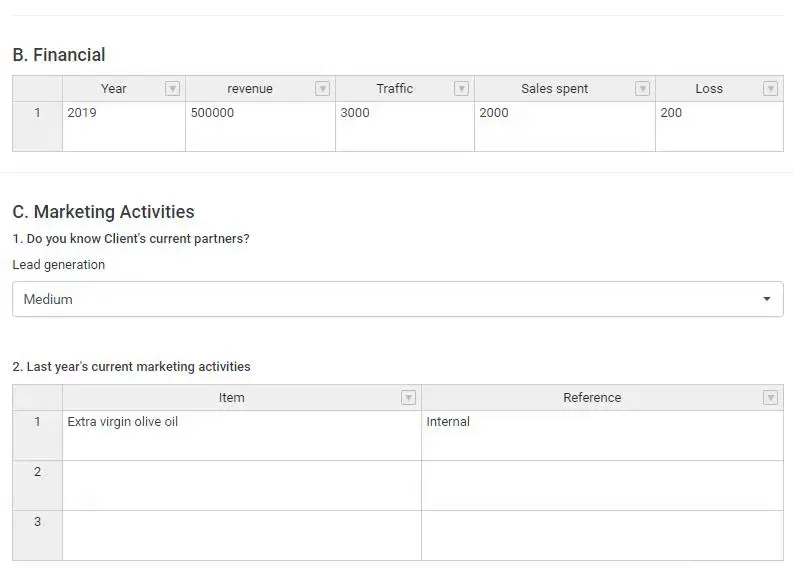
- Link projects, invoices, estimates and proposals - jump from a plan to any related record in one click, and see a direct link back to the plan when you open the linked project, invoice or estimate.
- Quick Create Project - spin up a new project from the Relations tab, automatically linked to the plan, with no duplicate data entry.
- Linked tasks and milestones - view a linked project’s tasks and milestones in the Relations tab and open any of them instantly.
- Bidirectional task sync - convert plan tasks into Perfex tasks; change the status on either side and the other updates to match, giving you a single source of truth.
Dashboard, filters and views
See the whole portfolio from the Perfex dashboard, then drill into exactly the plans that need attention.
- Main dashboard widget - draft, in-progress and completed counts, overdue tasks, Red/Yellow/Green client status, revenue versus plan and at-risk-account alerts, all from one glance at the Perfex dashboard.
- Powerful filters - filter by client, status, BCG model, Person In Charge, date range, overdue tasks, has-invoice or has-proposal to surface the plans that need attention.
- Saved filters - save your favourite filter combinations and apply them with a single click, perfect for recurring views such as “My In-Progress Plans”.
- Kanban view - drag and drop plans between Draft, In Progress, Review, Completed and Archived for visual status management.
- Table view with custom fields - add the columns you need, including custom fields, and act fast with bulk actions to change status for multiple plans, bulk copy to a new period or mass delete.
- Plan comparison - put two periods for the same client side by side and see exactly what changed.
Meeting notes, competitors and goals
Keep the qualitative story of the account in the same place as the numbers.

- Meeting notes and call logs - full add, edit and delete, with a date and notes for every meeting or call, so no conversation is lost.
- Competitor tracking - record competitors with a Low/Medium/High threat level, and edit or delete them as the landscape shifts.
- Goals and KPIs - set goals per plan with a target, actual value and due date, and track progress toward your key metrics.
- Plan health score - a calculated percentage based on tasks and progress shows at a glance how each plan is really doing.
- Plan approval workflow - capture who approved a plan and when, to formalise sign-off once a plan is ready.
Export, templates and recurring plans
- Export to PDF - one-click export of a plan to share with clients, attach to email or archive for compliance.
- Export to true Excel (.xlsx) - apply filters first, then export only the plans you need to the real Excel format for spreadsheet analysis.
- Plan templates - create reusable templates with vision, mission, objectives and structure, then start new plans from them for consistency and speed.
- Create next period - copy a plan to the next month or quarter manually whenever you need to.
- Recurring plan periods (cron) - enable auto-copy and, on the 1st of each month or quarter, completed plans are copied to the next period automatically. Set it and forget it.
Automation and integrations
- Task email reminders - staff assigned to plan tasks are emailed a configurable number of days before each deadline, so deadlines stop slipping. Configure it on a cron schedule.
- Webhooks - notify external systems whenever a plan is created, updated or deleted by adding a URL that receives a POST request with a JSON payload, ready to integrate with Zapier, Make or your own systems.
- Email merge fields - personalise Perfex email templates with account-planning data.
- Bulk email (notify assignees) - email every staff member with overdue tasks on a plan in one click to get the whole account aligned.
Client portal - view and request updates
- Client portal view - let clients see their account plans read-only in a mobile-friendly, responsive layout, with tables that adapt to small screens.
- Request update - clients request an update from the portal, staff are notified, and you mark each request as handled when it’s done.
- Client profile tab - account plans appear as a tab on the client profile, giving you quick access straight from the customer record.
Complete feature overview
Plan structure
- Due Diligence (financial, marketing activities)
- Team Information (company and client team)
- Service Ability Offering
- Planning (objectives, tasks, MindMap)
- BCG model and client status
- Revenue, margin and wallet share
- Goals and KPIs
Relations and sync
- Link projects, invoices, estimates and proposals
- Quick Create Project
- Linked project tasks and milestones
- Bidirectional task sync
- Reverse links from projects, invoices and estimates
Views and export
- Table view with filters
- Kanban view (drag and drop)
- Dashboard widget
- Export to PDF and Excel (.xlsx)
- MindMap export (PNG, SVG)
- Plan comparison
Collaboration
- Meeting notes and call logs (full CRUD)
- Competitor tracking (full CRUD)
- Activity log
- Custom fields
Automation
- Task email reminders
- Recurring plan periods (cron)
- Webhooks
- Bulk email (notify assignees)
- Email merge fields
Client portal
- View plans (read-only)
- Request update
- Mobile-friendly view
- Client profile tab
Templates and copy
- Plan templates
- Create from template
- Create next period
- Bulk copy to a new period
Insights and workflow
- Revenue vs plan dashboard
- At-risk account alerts
- Plan health score
- Plan approval workflow
- Default status setting
- Saved filters
- Role-based permissions
Why Account Planning?
- Everything in one place - no more switching between Perfex, spreadsheets and external tools; vision, mission, financials, tasks, relations and strategy all live in Perfex.
- Built for Perfex - native integration with clients, projects, invoices, estimates, tasks and staff means no duplicate data and no sync issues.
- Structured yet flexible - four core sectors give you a framework, while custom fields, templates and saved filters let you adapt it to your process.
- Visual strategy - the MindMap is built for brainstorming and planning, and exports to PNG or SVG for presentations.
- Client-facing - clients view plans and request updates in a mobile-friendly, professional portal.
- Automation that works - recurring plans, task reminders and webhooks let you set things up once and let the system run.
- Revenue and risk visibility - the dashboard shows revenue versus plan, at-risk accounts and overdue tasks, so you always know where to focus.
- Role-based permissions - control who can view, create, edit and delete.
Every feature ships with documentation that covers installation, activation, permissions and each tab in turn, with step-by-step guides written for non-technical users and a detailed feature overview that explains what each tab does and what you can achieve with it.
Support that actually answers
Buy direct and you reach the people who wrote the code - not a marketplace ticket queue.
- Priority support - replies the same day, straight from the development team that built it.
- Six months of priority support on Standard (extendable), and instant priority support on Pro for as long as the subscription is active.
- Support covers guidance on installation, configuration and upgrades - real answers, never canned macros.
- Regular updates and immediate bug fixing, included in every license type.
-
- Quick Create Project (from Relations tab)
-
- Fix project_settings for new projects (unserialize error)
- Migration + install.php fix for existing installations
- CSRF token fix for meeting notes & competitors forms
- Action buttons layout (inline, no wrap)
Ready to drop Account Planning into your stack?
Standard $49 one-time, or Pro from $9/mo billed yearly - updates and support while your subscription is active, and quick, secure checkout. Cheaper than the old CodeCanyon price, with no marketplace cut.
Read it before you buy it
Everything below is public. You can judge Account Planning without spending anything, and without asking us.
-
Documentation, in the open
The full Account Planning documentation lives on GitHub at
themesic/account-planning-module-for-perfex-crm- setup, configuration and day-to-day use, readable in a browser before you decide.
The sales and rating on this page are recorded by CodeCanyon, not by us: a review can only come from an account that bought the product, and every release passes Envato's review before buyers receive it. More on what we publish and how to check each figure yourself: open source and open specs at Themesic.
Frequently asked questions
Everything you need to know before buying - and what to do if you still have questions.
Is Account Planning compatible with the latest version?
Yes - the current release is v1.1.0, last updated September 2026, built for PHP 7.x, CodeIgniter. Lifetime updates keep it current as new platform versions ship.
What does the $49 Standard license include?
One payment of $49 covers the exact same files sold on CodeCanyon - full unencrypted source code, documentation and lifetime free updates - plus six months of developer support, at a lower price than the marketplace. It licenses a single installation you own and run.
Can I use Account Planning in a SaaS or a client product?
That is what the Pro plan is for: $9/mo billed yearly. It adds instant priority support for as long as the subscription is active, installation on unlimited domains you own, and the right to use the module in SaaS and multi-tenant products.
How do I receive the product after buying?
Checkout runs through Stripe. Your license key and download are issued instantly, and every future update is available from your account the moment it ships.
Related products
Other Perfex CRM Modules built and maintained by the same team, sold direct.


Featured in these guides
Comparisons from our catalogue where Account Planning earns its pick - see how it stacks up.